
How to Prepare a Resume for Freshers: A Step-by-Step Guide (2026)
19 Jul 2026 · 8 min read
If you've ever stared at a blank page thinking "I have no experience, so what do I even put on my resume?" — you're not alone. Almost every fresher in India starts exactly here, and the good news is that a strong first resume has very little to do with years of work. It has everything to do with structure, keywords, and showing what you can actually do.
Recruiters spend six to eight seconds on a first pass. Before that, an ATS (Applicant Tracking System) scans your file for the right sections and keywords. So preparing a resume isn't about writing more — it's about putting the right things in the right order, in a format a machine and a human can both read fast.
This guide walks you through it step by step: what sections to include, how to write bullets when you've never had a job, how to pass the ATS, and a quick before/after so you can see the difference. Let's build it.
Step 1: Pick a clean, ATS-friendly format
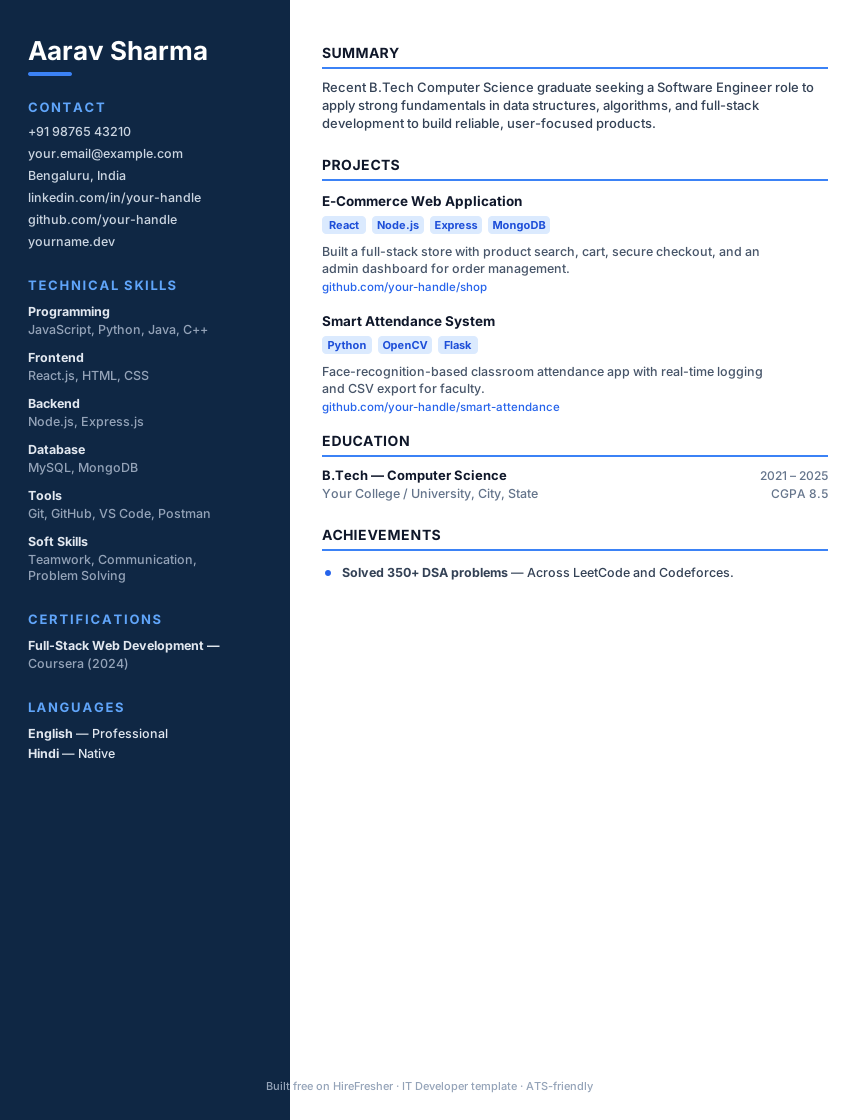
Before you type a single word, decide the skeleton. As a fresher you want a reverse-chronological layout on one page: contact details at the top, then a short summary, education, skills, projects, and any internships or certifications. Skip the fancy two-column templates with sidebars, graphics, and profile photos — most ATS software mangles them, and your text ends up scrambled or invisible to the parser.
Stick to a standard font (Calibri, Arial, or similar), 10.5–12pt, black text on white, and consistent spacing. Save and send it as a PDF unless the job post specifically asks for a Word file. If you want to understand why formatting matters this much, read what is an ATS resume — it explains how the software actually reads your file.
- One page — freshers rarely need two
- Reverse-chronological order (most recent first)
- No photos, no tables inside tables, no text boxes
- Clear section headings the ATS recognises: Education, Skills, Projects
A quick before/after (suppose this is you)
Suppose Aisha, a final-year B.Tech student, sends out a resume that says: "Objective: Seeking a challenging role. Skills: C, Java, Python, HTML, communication, hard-working. Project: Made a library management system." It's honest, but it says nothing specific — and it gets no callbacks.
Now suppose she rewrites it: a summary that reads "Final-year CSE student targeting a backend developer role, comfortable with Java and SQL," and a project bullet that reads "Built a library management system in Java + MySQL handling 2,000 book records with search, issue, and fine-calculation features." Same student, same project — but the second version shows she can build something real. That's the whole game, and it's a fifteen-minute rewrite.
Step 2: Get the header and contact block right
This is the easiest section to nail and the easiest to mess up. Put your full name at the top, then one line with your phone number, a professional email, your city, and links to your LinkedIn and GitHub (GitHub matters a lot for tech roles).
Two rules that quietly cost freshers interviews: use a grown-up email like firstname.lastname@gmail.com — not coolguy_2003@ — and make sure your phone number has no typos. Recruiters won't chase you if the digit is wrong; they just move to the next candidate.
Step 3: Write a summary or career objective that says something
Right under your header, add a 2–3 line summary. For a fresher this doubles as your pitch: your degree, your core skill area, and the kind of role you want. Avoid the tired "Seeking a challenging position in a reputed organisation to utilise my skills" line — recruiters have read it ten thousand times and it says nothing.
Instead, be specific: what did you study, what can you build, and what role are you targeting. A good objective mentions a skill and a direction. If you're stuck on wording, our career objective for freshers guide has fill-in-the-blank examples you can adapt in two minutes.
Step 4: Turn projects and internships into your "experience"
This is where most fresher resumes fall flat — and where you can stand out. You may not have a job, but you have academic projects, a final-year project, hackathons, freelance gigs, or a college fest you helped organise. All of it counts if you frame it with impact.
The trick is to write bullets that show action and result, not just tasks. Start each bullet with a strong verb, say what you did, and where possible add a number. "Made a website" tells me nothing. "Built a college event registration site in React that handled 400+ sign-ups over 3 days" tells me you can ship something real.
For the how-to on this, writing a project description in your resume breaks down the exact bullet formula. Aim for 2–4 bullets per project, and lead with your best project.
- Weak: "Worked on a machine learning project."
- Strong: "Built a spam-email classifier in Python (scikit-learn) achieving 94% accuracy on a 5,000-email dataset."
- Weak: "Was part of the college tech fest."
- Strong: "Coordinated a 12-member team to run a 300-attendee tech fest, managing budget and vendor logistics."
Step 5: List skills honestly and match the job
Group your skills so they're scannable: Languages, Tools/Frameworks, and Soft skills. Only list what you can actually talk about in an interview — if "Java" is on your resume, be ready for a Java question. Padding your skills section with things you touched once is the fastest way to get caught.
Here's a smart move most freshers miss: read the job description and mirror its exact keywords where they're genuinely true for you. If the posting says "SQL" and you know SQL, write "SQL" — not "database querying". ATS keyword matching is literal. Run your draft through our free ATS checker to see which keywords you're missing before you apply.
Step 6: Proofread, then build it fast (free)
One spelling mistake or a broken alignment can undo a great resume. Read it out loud, check every date, and get one friend to look at it. Keep tense consistent — past tense for finished work, present for ongoing.
You don't need to fight with Word margins to get all of this right. HireFresher is a free self-serve resume builder: you fill in your details, preview a clean ATS-ready layout live, and download up to 3 free-template PDFs at no cost. If you want a premium design, it's ₹49 for one template (3 days) or ₹99 for all templates (7 days) — no ₹199 "we'll write it for you" nonsense, you stay in control. Start with the free resume builder for freshers and you'll have a first draft in about fifteen minutes.
The One Thing We See Most
At HireFresher we've watched thousands of fresher resumes pass through our ATS checker, and the single biggest mistake is the same one almost every time: freshers describe what they were asked to do instead of what they actually achieved. "Responsible for testing" instead of "Wrote 40+ test cases that caught 12 bugs before release."
The resumes that get shortlisted read like proof, not a job description. You don't need a fancy template or big-name internships — you need three or four concrete, number-backed bullets and a clean format the ATS can read. Fix that one habit and your first resume immediately looks a level above the pile.
FAQs
How long should a fresher resume be?
One page. As a fresher you rarely have enough relevant content to justify two pages, and recruiters prefer a tight, scannable single page. Cut anything that doesn't add value.
What do I put in a resume if I have no experience?
Lead with education, then academic and personal projects, internships, certifications, and skills. Frame projects with action-and-result bullets — those act as your experience and show what you can actually do.
Should a fresher use a resume objective or a summary?
Either works, but make it specific. Mention your degree, your core skill, and the role you want in 2–3 lines. Avoid generic "seeking a challenging position" filler that says nothing about you.
Is a PDF or Word resume better for freshers?
Send a PDF unless the job post specifically asks for Word. PDF preserves your formatting across devices, and most modern ATS software reads text-based PDFs without any problem.
Do I really need an ATS-friendly resume as a fresher?
Yes. Most mid-to-large companies filter applications through an ATS before a human sees them. A clean, keyword-matched, single-column layout ensures your resume is actually parsed instead of silently rejected.
Build your resume free
Create your free ATS-friendly resume in minutes using our free resume builder.
Create free resumeJob Alerts
Get new resume tips & fresher job-prep guides — free, no email needed.